Backups and restores
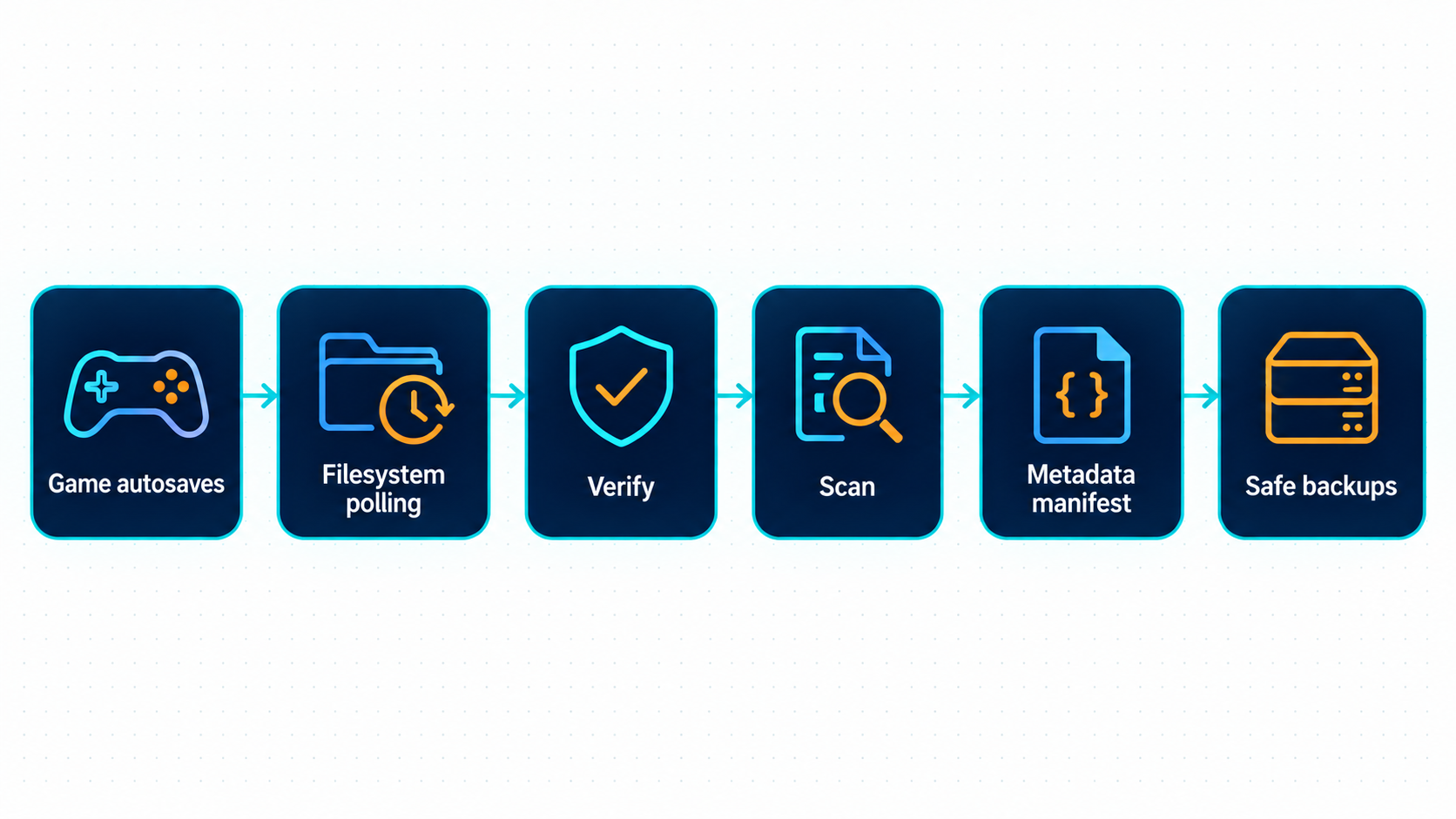
SSUI copies complete Stationeers autosaves into SSUI/savebackups/<SaveName>. Open Backups in the web UI, or visit /backups, to inspect, download and restore them.
Important
Safe backups are separate from the game's rotating autosaves, but they are still on your server's storage. Copy them off-host too. A second folder on a dead disk is not much of a disaster-recovery plan.
Check that backups work
- Enable game autosave and let Stationeers write a save while simulation is running.
- Check
saves/<SaveName>/autosavefor the source archive. - Wait for SSUI to observe an unchanged file twice, at least 45 seconds apart, then validate and copy it.
- Open Backups and check the filename, timestamp and world summary. Processing can take longer for large worlds.
The BACKUP log reports Backup handled when copying and analysis complete. Backup archived ... deep analysis pending means the archive exists but statistics need another attempt. A manifest-write warning is separate from whether the archive was copied.
Inspect or download
The list shows newest backups first. Expand a row to see available world, version, days played, object/network counts and deep statistics such as players and furnaces. These describe the archived save, not the live world.
Select Download to keep the original archive. Discord's /download defaults to the newest file and has a 10 MiB cap; use the web UI or filesystem for larger saves.
Every action selects an actual filename, including any nested path. If a file disappears, the action fails; it does not silently choose its new neighbor. Old numeric API selectors and Discord buttons need updating. API contract.
Restore a backup
Caution
Restore replaces the active HEAD save. SSUI does not automatically preserve the previous HEAD. Save and stop the game, then make an independent copy of the active world if you might need to undo this decision.
- Confirm
SaveNameidentifies the world you intend to replace. - Save and stop the game using Save and stop.
- Copy the existing world directory somewhere outside the active save path.
- In Backups, select the required filename and save time, then Restore and confirm.
- Wait for completion. A failure can leave the server stopped; inspect the error before retrying.
- Start the server and join it to check the restored state.
| Interface | After a successful restore |
|---|---|
| Web UI / HTTP API | Game remains stopped; you start it |
| Discord admin restore / passed restore vote | Game starts automatically |
Restore preflight checks the selected archive before stopping a running game, then checks again under the backup lock. Storage can still disappear between those checks. Do not run maintenance from several interfaces at once.
Choose retention
Automatic cleanup is disabled by default. Safe copies accumulate until you enable it or manage storage yourself.
In configuration, set these values and enable backupRetentionEnabled only after checking your first backups:
| JSON setting | Default | What survives cleanup |
|---|---|---|
backupKeepNewestCount |
2 |
The newest two archives |
backupDailyRetentionDays |
7 |
One representative per covered local calendar day |
backupWeeklyRetentionWeeks |
4 |
One per covered local ISO week |
backupMonthlyRetentionMonths |
3 |
One per covered local calendar month |
backupCleanupIntervalHours |
24 |
Hours between cleanup runs |
The retention rules form a union. A file kept by any rule survives, and one file can satisfy several rules. This is not a promise to keep exactly sixteen files. A 0 disables an individual keep rule; setting every keep rule to zero leaves no such protection.
Warning
Cleanup deletes files. Review the resulting history before relying on it. Old retention keys are intentionally not migrated: upgrades reset cleanup to disabled with the new defaults, so you must review and enable the policy again.
Retention uses the save timestamp from world_meta.xml and the host's local calendar. Archives without a readable summary are excluded from retention. After safe-backup cleanup succeeds, source autosaves older than 24 hours may also be deleted, but only when a successfully analyzed matching safe archive still exists. Storage/manifest failures block unsafe cleanup.
Invalid negative values or invalid cleanup intervals loaded from JSON/environment disable cleanup and restore safe defaults. The UI/API rejects those values before saving. Exact environment names are in Configuration.
Storage requirements
The directories are derived from SaveName:
saves/<SaveName>/autosave/
SSUI/savebackups/<SaveName>/
  backup-meta-manifest.ssui
BMv4 polls directory contents; it does not depend on filesystem notifications. SMB/CIFS, NFS and ZFS still need tests of actual file visibility, permissions, rename behavior and reconnects. Polling fixes missing notifications. It does not fix a missing NAS.
Use one SSUI manager per folder pair. Source and archive directories must not overlap, including through symlinks. Configured root symlinks are supported; arbitrary symlinks inside scanned directories are not followed. A mount disappearing behind an ordinary empty directory can look like an empty folder; blocked kernel I/O has no guaranteed cancellation deadline.
For a move, save and stop first, preserve the world and SSUI data, and verify ownership at the destination. Manually imported archives are normally discovered after a backup-manager/backend reload. Keep off-host copies independent of retention at the source. The old saves/<SaveName>/Safebackups directory is left untouched during the v6 upgrade.
If a backup is missing
| Observation | Check next |
|---|---|
| No source autosave | Active SaveName, Auto Save, paused simulation and game logs |
| Source exists, no safe copy | Writable SSUI/savebackups, two stable observations, free space and BACKUP errors |
| Archive exists, no statistics | Pending/failed analysis, malformed XML or size limits |
| File disappeared | Retention settings and log, mount availability, external deletion |
| Restore failed | Exact filename, readable archive, destination space and permissions |
Enable debug logging for the BACKUP subsystem when diagnosing polling or analysis. Support packages describes the collection workflow.
Processing and recovery reference
Polling, archive validation, RAM inventory and manifest recovery
### How it works 1. Stationeers writes a backup into the active save's `autosave` directory. 2. SSUI scans that directory immediately on startup and then every 45 seconds, measured from the end of the previous scan. No `fsnotify` or operating-system creation event is required. 3. A new file is observed first. If its size and modification time are unchanged at a subsequent scan at least 45 seconds later, handling checks the save archive. Any observed change restarts that interval. 4. Both `world_meta.xml` and `world.xml` must have complete XML structure, the expected root elements, and valid ZIP checksums. The uncompressed limits are 1 MiB for metadata and 1000 MiB for world XML. 5. Handling copies into a temporary file in `SSUI/savebackups/For concurrency, manifest structure and isolated stress-test commands, see the developer guide.